

TL;DR
- A listing site sells the building. It doesn’t sell you. Your practice needs its own home.
- Free isn’t free if you don’t control it. Ask what’s left of your work after the listing ends.
- Your listings are only part of your business. Tenant work, buyers and referrals usually don’t show up there.
- Use the listing sites. Just don’t live there.
- Keep your history on your own address. Not on someone else’s platform.
The owner remembers the portal, not the practice
An owner asks for background after a referral. You search your own name and find a property page on a listing service.
The page explains the offering. The service’s address and navigation surround it. Your tenant work, completed assignments and acquisition help are harder to find.
The page is doing its job just fine. Its job is selling that building. It was never built to sell you.
Your listings on someone else’s website are not your online presence.
I’m not picking a fight with the big listing sites. Keep using them. They’re great at what they do. My fight is with the advisor who says, “I don’t need a website, my listings are online.” That’s like saying you don’t need a business card because your name is on a yard sign.
A prospect checking you needs an account of you. The current inventory is only part of that account.
Myth: Free settles the decision
Free describes a charge under a particular arrangement. It does not tell you what you control or what the page explains.
The service has its own address, presentation and purpose. A visitor sees its name as well as yours. That is a normal feature of using a marketplace, not a complaint about the company.
The hidden cost is the missing job. If you put all the writing effort into current offerings, where does the fuller account of the practice live?
An owner checking a referral should be able to examine completed work. A tenant should be able to understand how you help with a space decision. An investor should be able to find the approach behind an acquisition.
None of that is settled by whether a property page was free to publish.
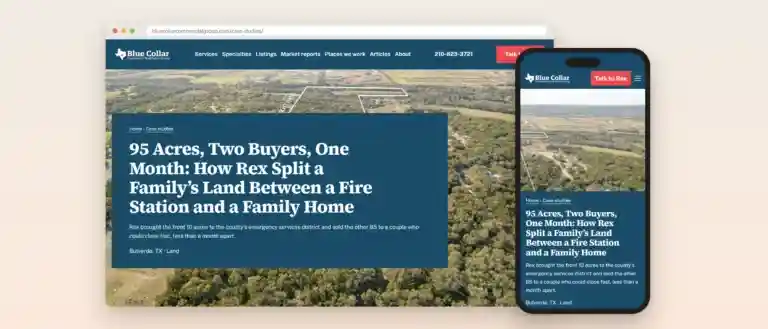
At Blue Collar Commercial Group, I want our team’s explanation somewhere we can maintain it. A useful portal remains useful. It simply does not relieve us of the rest of the work.
When your work appears on a listing service, it appears in that service’s setting.
The web address, navigation and presentation identify the place the visitor is using. The property may be the reason for arriving, but the reader is also becoming familiar with the service.
Your name can appear there and be useful. The issue is not that you receive no benefit. It is that the page does not belong solely to your account of the practice.
On an owned domain, a web address you control, you can present the broader explanation and maintain it according to your arrangements and rights.
Myth: My inventory explains my business
Say your current listings happen to be two retail buildings in suburban Denver. But you also help tenants find space, warehouse owners find tenants, and buyers look at land.
The inventory is accurate. As a description of the whole practice, it is incomplete.
That difference matters when a referral arrives with a need outside the active properties. The reader has no reason to know the work the page doesn’t explain.
Add the range in ordinary client language. Explain owner services, tenant work, acquisitions and introductions where those accurately describe the practice. Use permitted accounts of completed work to support them.
An active listing is a property currently being offered. A case study is an account of a client problem, the approach and the result. They can live alongside each other, but they are not interchangeable.
Do not let the work most recently photographed define the work you are available to discuss.
Read the rules that apply to the service and your account. Then try the actual features.
Can you edit the description? Can you link to useful background? What happens when a property is no longer available? How do you correct an error?
Different services and arrangements can answer these questions differently. Do not turn a limitation you encounter on a particular page into a claim about all portals.
Also check who in your office controls the account. A service may offer an editing option while your actual access is limited by the firm’s arrangement.
Inspect the contact route as a visitor.
A page may provide contact details, a form or another way to inquire. Check which information is requested and where the message goes under your account arrangement.
Do not assume that every service handles inquiries the same way. Do not assume your own website handles them well either. A form on your site still needs to be tested and monitored.
What matters is whether you understand the route and the responsibility for responding. Clarify access to inquiry information and any limits on retaining or moving it.
Myth: Someone else’s page will preserve the history
Create an approved account of completed work on a site you control.
A listing page may remain available after closing, or it may change. Check the actual result. Your public history should not depend entirely on a service retaining the exact account you need.
The completed-work page has a different purpose from the active listing. It explains the situation, your role and the outcome. It should not invite inquiries about a property no longer offered under the assignment.
Check permissions for text, photographs and client details before reusing material. A listing being public does not mean every part may be reused indefinitely.
Myth: I must choose between portals and my own site
You can give each place a job.
Use the listing service where it helps present the offering. Use your own site for the broader account: identity, markets, services and completed work. Keep facts aligned wherever you control them.
AI referrals add a reason for the owned account to be easy to read. JavaScript is extra code a browser can run before a page finishes. Some sites rely on it to reveal the important words.
searchVIU reported that 69% of AI crawlers can’t run JavaScript (November 2025). These are tools that visit pages to collect information. Simple, fast pages on your own site are easier for many of those tools to read.
You don’t need to make the listing sites the villain. Three plain reasons are enough to want your own page: you control it, it tells the whole story, and it doesn’t disappear when the deal closes.
Give the property its marketing channels. Give the practice a lasting explanation.
Create the original explanation of your work with reuse in mind.
A clear account can support your site, an introduction and a relevant follow-up. Shorter descriptions elsewhere can point to it where linking is allowed and useful.
Keep the facts aligned. A property status change should not leave an active invitation on one page and a completed account on another page you control.
Avoid spending all your writing effort on a place where the history may be difficult to maintain. That does not mean every portal description should be brief. It means deciding deliberately which account serves as the lasting explanation.
Assign the missing job this week
Review the channels you already use before changing the marketing plan. The exercise should identify a missing job, rather than create an argument against a useful service.
- Look yourself up. Note whether the results describe your practice or mainly show properties on other services. Check what an owner would learn from each.
-
Inspect the account rules. Confirm editing access, link options, contact routes and what happens after a listing ends. Record what is unclear and ask the service or your firm.
-
Test an inquiry. Use the contact route as a visitor. Confirm the destination and who handles the response.
-
Create your own clear introduction. Describe markets, services and client roles on a site you control. Include direct work and appropriate referral work accurately.
-
Add completed-work background. Choose an assignment you can discuss publicly. Explain your role and outcome without treating it as a currently available property.
- Keep the channels aligned. Correct status and contact details where you control them. Link to the fuller record where the service permits it and the link helps the reader.
Save approved writing and permitted images outside the website. Clarify who controls the domain and what material you can move if you change providers.
Keep using channels that help market the property. Maintain the broader advisor record separately from current inventory.
Check who owns the explanation
Open the pages where your name appears. On each, ask what a stranger can learn about the practice and what you can correct.
Then look at a completed assignment. Can you find your role? Can you save the permitted writing? Is the status clear? Do you know who controls the account?
You are checking the actual arrangement, not guessing a service’s policies. Different services and firm accounts can have different rules.
Finally, find the owned domain, a web address under your control, where the full explanation belongs. If there isn’t one, you have found the gap.
The test is deliberately plain. You do not have to know anything about advertising technology to see whether your own account of the practice exists.
Where UpliftCRE fits
We built UpliftCRE after testing the approach in our own firm, Blue Collar Commercial Group. Our team’s record needed a home beyond the properties currently being advertised.
UpliftCRE provides a commercial real estate website built so prospects and AI can read it, plus an AI marketing staff that writes with you in ten-minute meetings. You bring the services, local knowledge and facts behind completed work. You review each page you create before it publishes. On the Growth and Authority plans, Market Voice also publishes articles about your local market for you each week.
It can sit alongside the portals you use for property marketing. The point is a complete account of your practice that you can keep explaining as assignments begin and end.
Frequently asked questions
Should I stop using listing portals?
No. Use portals where they fit the offering. Keep a separate account of your practice under your control.
Does free mean there is no trade-off?
It describes a cost under a particular arrangement. Check control, effort, contact routes and what information you can retain.
Do all portals handle closed listings the same way?
No. Check the service and account you actually use rather than assume a universal policy.
Can an AI tool find a portal page?
It may, depending on the page, tool and question. There is no basis here for claiming all portal pages are unreadable.
What belongs on my own site?
Your identity, services, markets and approved accounts of work. Include the breadth that current offerings alone may not show.
Can I copy listing material into my history?
Check the rights and permissions first. Rewrite the account for completed work and make the status accurate.
Glossary terms used in this article
- Listing service: A service used to present properties being offered.
- Owned domain: A web address under your control.
- Active listing: A property currently being offered under a marketing assignment.
- Case study: An account of a challenge, the approach and the result.
- Completed-work page: A public account of an assignment that has ended.
- Inventory: The properties currently being offered.
Sources: searchVIU, November 2025, AI crawlers and JavaScript rendering.